Foja
Your CV in Typst, without writing code
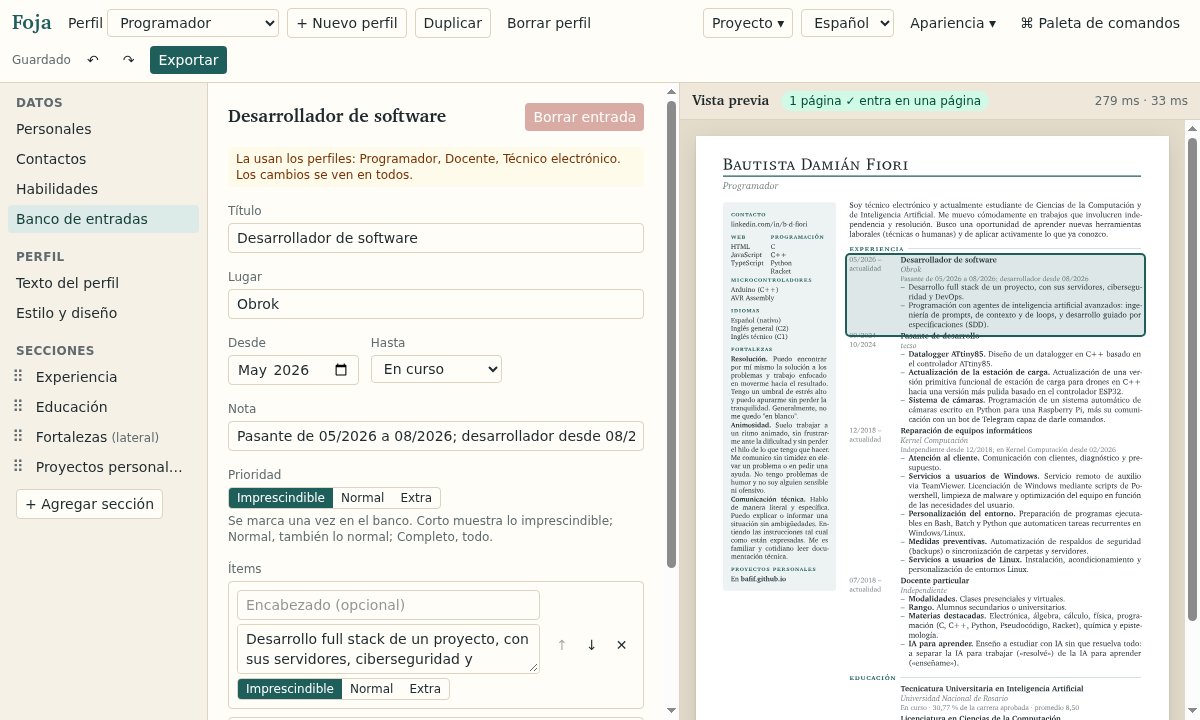
You fill in forms and see the real Typst output next to them, as you type. One bank of experience feeds several profiles: the CV for a programming job and the one for teaching come from the same data.
Free, no accounts, and it works offline once it has been opened. On a phone it installs as an app: from Chrome on Android, and from Safari or Chrome on iPhone (Share → “More” → “Add to Home Screen”).
Your data stays on your device
Foja runs entirely in the browser, the Typst compiler included. No server keeps your CV; it stays in this browser and in the files you export.
One page, no guessing
A badge tells you whether the CV fits on one page and, if not, how many lines spill over and which parts are left out. Click the preview and you go straight to editing that part.
Styles of your own, in Typst
Nine Foja styles (Legajo, Banda, Minimal, three that applicant tracking systems read well, Claustro, Recto and Llano, and three for a CV with little in it, Arco, Rótulo and Portada) with their options: columns, photo, colour, typeface, margins, paper. And if you want another, “Edit in Typst” gives you the style's code to make it yours.
Export to whatever they ask for
- PDF: the CV, ready to send
- JPG: one image per page, for forms that want an image
- Word: in one or two columns, editable
- Typst: the source code, which opens in typst.app
- LaTeX: for Overleaf or your own TeX installation
- Markdown: for a README or a GitHub profile
- JSON: your project, to keep it or move it to another device
- JSON Resume: the open format of other tools, which it imports too